
Welcome to IGNITE! In this article, we'll provide a brief overview of everything you need to know to get yourself firing with IGNITE.
In this article
What is IGNITE?
What do I need?
How does it work?
What is IGNITE?
IGNITE is a reusable wireless firing system that puts the power of fireworks in the palm of your hand. Whether you're putting on a small backyard display or coordinating a larger show, IGNITE makes it easy, safe, and exciting to launch fireworks right from your phone or tablet.
With the IGNITE App, you can connect and control up to six wireless firing modules—either the i18 or i36—for a total of up to 216 individual cues. That means you can create stunning, precisely timed shows with just a few taps on your screen.
IGNITE makes fireworks simple, safe, and fun—whether you're a first-time user or a seasoned pro.
What do I need?
Before you can fire the greatest show your backyard has ever seen, you'll need the following:
- A phone or tablet with the IGNITE App installed
- At least one IGNITE module
- Igniters to connect the module to your fireworks
- Fireworks!
How does it work?
The App
After downloading the IGNITE app to your device, you can log in with your Apple ID or Google account. Using the app you can connect your modules, catalog your fireworks, manually shoot a show, as well as review and shoot your scripted shows and pyromusicals.
Modules
The Modules screen is where you will connect your modules for the first time, manage their colors, check battery levels, switch firing modes, and manage firmware updates for your equipment.
- How to Onboard/Pair an IGNITE Module to the IGNITE App
- How to Change the Color Indicator of My IGNITE Firing Module
-
How do I update the firmware on my Module?
Fireworks
Conveniently manage your Fireworks catalog by adding, creating, and editing your entries. You can manually create Firework entries, scan the barcodes of your existing fireworks to add them, or import Fireworks from the IGNITE Brands Catalog. This list automatically sync with your IGNITE Show Designer so anything you add from the app on the go will be available to use in your show scripts right away.
Free Shoot

Itching to start your show and don't need a script? The Free Shoot screen allows you to manually fire your shows in any order you want. Simply select your module and cue, then tap the big red button. You can even select multiple modules to fire at once for bigger effects!
- How to Use IGNITE Free-Shoot
- How to Fire Multiple Modules at the Same Time with IGNITE
-
How to Clear Free-Shoot Firing Memory
Shows
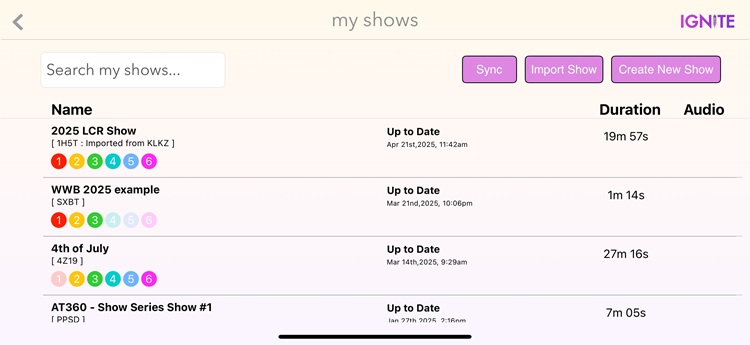
After creating a show in our free IGNITE Show Designer, simply use your show's 4 character code to import the show to your phone or tablet. You can even share your show with friends by giving them the same code! From the Shows screen in the IGNITE app you can view and manage your scripted shows, check the modules scripted into the show, and fire your pyromusicals. Simply start the show and sit back to enjoy as IGNITE automatically fires for you.
- How to Use IGNITE Free-Shoot
- How to Add Audio to a Show in Show Designer
- How to fire a scripted show
Check out our guide on How to Find and Download the IGNITE App to get started!
The Modules
IGNITE modules come in two sizes with the i18 having 18 unique firing cues, and the i36 having 36 cues. You can connect up to 6 modules with each module having its own identifying color. When a cue is fired, the designated module will send a pulse of electricity to the cues specified by the app which is then transferred to the igniter and used to light the fuse of your fireworks.
What is a cue?
A cue refers to the square cue connections on the i18 and i36 where you plug in your igniters. Each cue offers its own control unhindered by the other cues on the module, meaning that if you want to fire cue 1 you will only be firing from cue 1. Shows can script cues to fire at particular times, firing just one or multiples, or even multiple cues across multiple modules.
What is a color?
A color is assigned to your IGNITE module when you first connect it to your phone. This helps the app identify which module is supposed to be firing when you hit the Shoot button in Free Shoot, as well as helps your scripts identify which should be firing which cue when. Colors can be changed at any time, and only one module can occupy any color.
What's in the box?
With every IGNITE module you will receive:
- 1x module
- 1x rechargeable Lithium Polymer (LiPo) battery
- 1x USB charger
- 1x Omnidirectional Antenna
- 1x Emergency battery harness (9V battery compatible)
The Igniter
Igniters are single-use and are designed to light the firework fuse by using the electric pulse sent by the IGNITE module. IGNITE offers clip-on style igniters and does not recommend using professional E-Match or Fuse-Tube style. This is because of their inherent sensitivity to Electrostatic discharge (ESD). The IGNITE firing system is a consumer-grade fireworks firing system and is not designed for these igniter types.
Clip-On, or talon, igniters use a clip with a fragile tungsten coil inside which uses the module's electric pulse to heat up the coil and ignite the fuse on fire.
Comments
0 comments
Article is closed for comments.